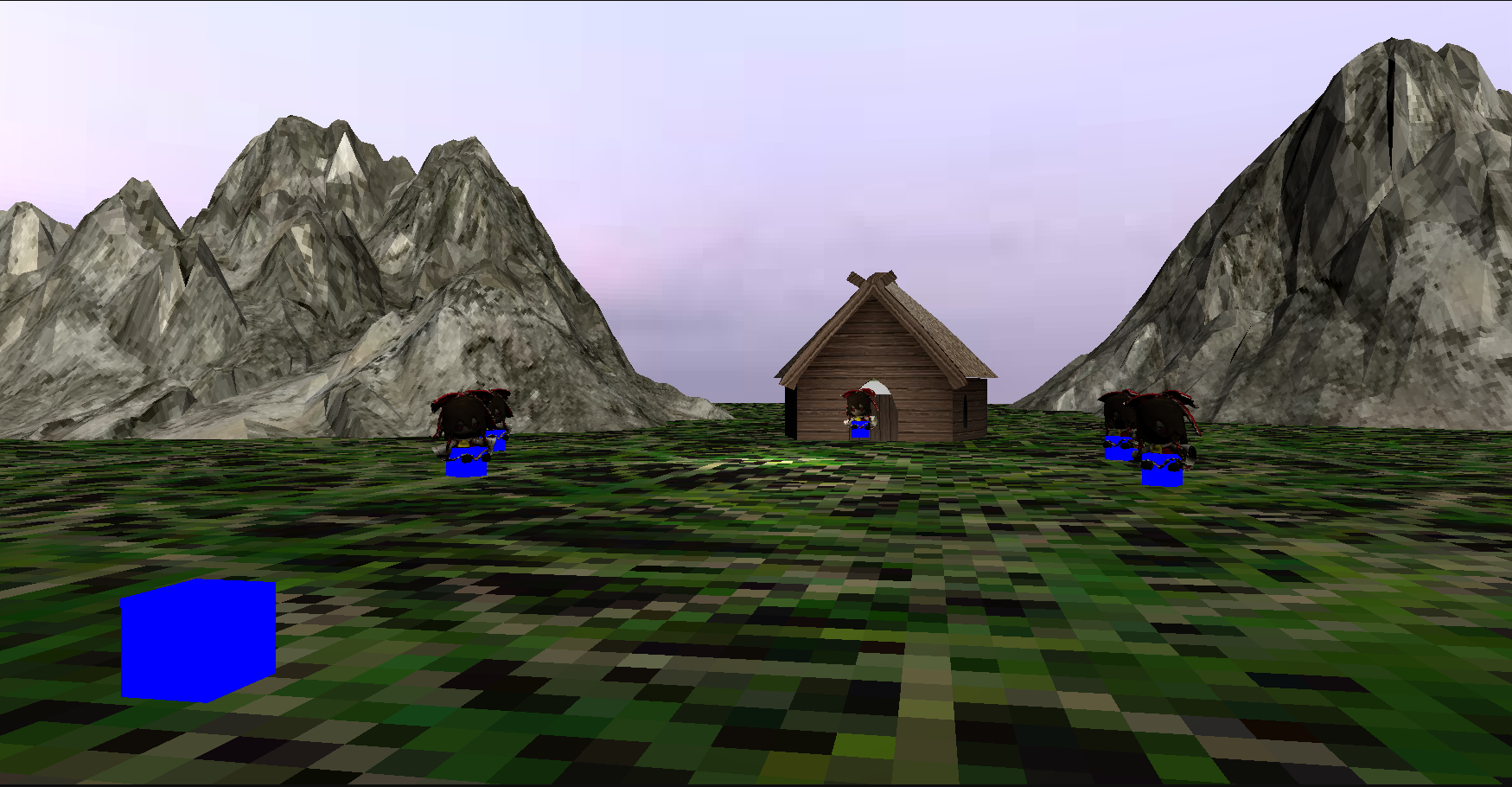
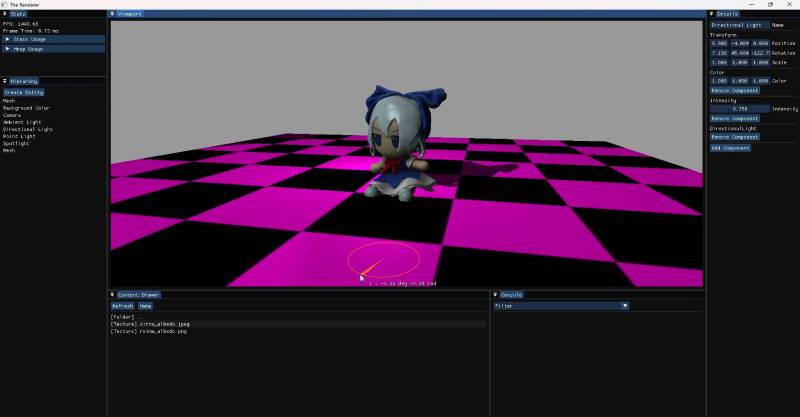
RNGOEngine is a Data Oriented ECS Game Engine developed in C++. The purpose of the project is ultimately to make a generic game engine to use for future projects and to further widen my knowledge of C++ and rendering far beyond something like Unreal Engine. For rendering the engine uses OpenGL, GLFW and ImGui for its editor.
Entities
Entities are handled by the Entity Component System implemented using EnTT. Components can be added through the interface in a Unity-like manner through the Entity Properties. Entities can be operated on by adding any system which inherits from the base-class ISystem to the SystemScheduler. These Systems run each frame and operate on and transform the data represented in the ECSWorld. Whether it be Physics, gathering the RenderWorld or any other system.
struct MeshRenderer
{
    AssetHandling::AssetHandle ModelHandle;
    AssetHandling::AssetHandle MaterialKey;
};

struct Transform
{
    glm::vec3 Position = {0.0f, 0.0f, 0.0f};
    glm::quat Rotation = glm::quat(1.0f, 0.0f, 0.0f, 0.0f);
    glm::vec3 Scale = {1.0f, 1.0f, 1.0f};

    glm::mat4 GetMatrix() const;
};

struct Camera
{
    float FOV = 45.0f;
    float NearPlane = 0.1f;
    float FarPlane = 100.0f;
};

struct LightFalloff
{
    // Standard range is 100
    // https://wiki.ogre3d.org/tiki-index.php?page=-Point+Light+Attenuation
    float Constant = 1.0f;
    float Linear = 0.045f;
    float Quadratic = 0.0075f;
};
template<typename TSystemContext>
class ISystem
{
public:
    virtual ~ISystem() = default;

    virtual void Initialize(Core::World& world, TSystemContext& context)
    {
    }

    virtual void Update(Core::World& world, TSystemContext& context)
    {
    }

    virtual void Exit(Core::World& world, TSystemContext& context)
    {
    }

    std::string_view GetName() const
    {
        return m_debugName;
    }

protected:
    std::string_view m_debugName;
};
Rendering
Rendering is handled in three stages: RenderSystem, RenderAPI and IRenderer. The RenderSystem collects all MeshRenderers, Lighting and Camera information and submits draw calls. The RenderAPI is a higher-level abstraction on top of the RenderAPI and handles higher-level concepts of FrameTargets and RenderPasses. RenderPasses have virtual functions for their execution and are passed a reference to the IRenderer to separate the logic for things such as ShadowPass and ForwardPass. Currently the Engine only supports Forward Rendering with Shadow Mapping, but a deferred pipeline is planned. One of the philosophies behind this design is to keep a specific graphics API limited only to the lower-level IRenderer and to never have direct OpenGL calls anywhere outside of that class.
void RenderSystem::Update(RNGOEngine::Core::World& world, EngineSystemContext& context)
{
    RNGO_ZONE_SCOPED_N("RenderSystem::Update");

    EngineSystem::Update(world, context);

    RNGOEngine::Core::Renderer::DrawQueue drawQueue;
    GatherOpaques(world, context, drawQueue);

    GatherCameras(world, context, drawQueue);
    GatherLights(world, context, drawQueue);
    GatherBackgroundColors(world, context, drawQueue);

    // Submit draw queue to renderer.
    context.Renderer->SubmitDrawQueue(std::move(drawQueue));
}
namespace RNGOEngine::Core::Renderer
{
    class RenderPass
    {
    public:
        explicit RenderPass(IRenderer& renderer, const int width, const int height)
            : m_renderer(renderer), m_width(width), m_height(height)
        {
        }

    public:
        virtual ~RenderPass() = default;

    public:
        virtual void Execute(RenderContext& context) = 0;

    public:
        virtual Resources::RenderTargetSpecification GetRenderTargetSpecification() const = 0;

    public:
        virtual void OnResize(const int width, const int height)
        {
            m_width = width;
            m_height = height;
        }

    protected:
        IRenderer& m_renderer;
        int m_width, m_height;
    };
}
void ForwardPass::Execute(RenderContext& context)
{
    RNGO_ZONE_SCOPED_N("ForwardPass::Execute");
    m_renderer.EnableFeature(DepthTesting);

    const auto frameBufferID = context.renderPassResources.GetFrameBufferID("Forward Pass");
    m_renderer.BindFrameBuffer(frameBufferID);
    ClearAmbientColor(context.drawQueue);
    RenderOpaque(context.drawQueue);
}
Assets/Registries
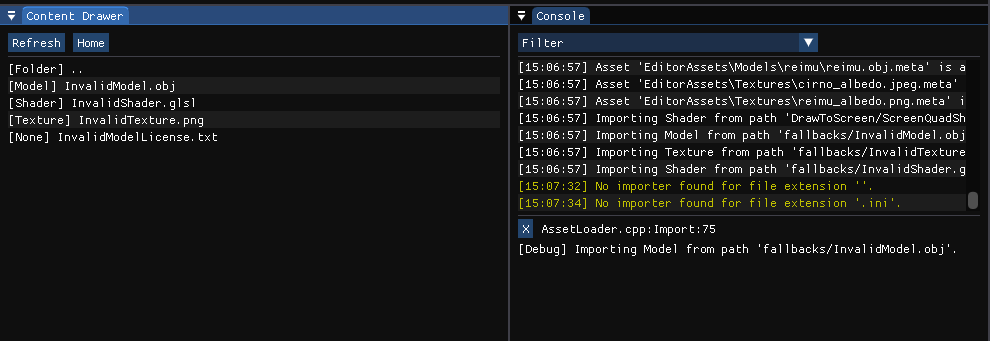
In order to render anything we first need to have a shader, model and texture assets. Taking inspiration from Unity I developed an asset-metadata system for persistently storing UUIDs and import settings of different assets. In this way, Assets can be stored in a central registry and referenced in the ECS using AssetHandles. As AssetHandles are just UUIDs/integers under the hood this greatly cuts down on the size of storing something like a stack-allocated string for path and improves the cache-locality of using a heap-allocated string.
// 64-bit wide UUID.
class UUID
{
public:
    explicit UUID(std::uint64_t value);
    // NOTE: Default constructs to zero UUID. Make sure this is your intention. Use GenerateUUID() to get a random UUID.
    UUID();

    ~UUID();
    UUID(const UUID& other);
    UUID& operator=(const UUID& other);
    UUID(UUID&& other) noexcept;
    UUID& operator=(UUID&& other) noexcept;

    bool operator==(const UUID& other) const;

    std::uint64_t GetValue() const
    {
        return m_uuid;
    }

    explicit constexpr operator uint64_t() const
    {
        return m_uuid;
    }

private:
    std::uint64_t m_uuid;
};
class RuntimeAssetRegistry : public Utilities::Singleton<RuntimeAssetRegistry>
{
public:
    RuntimeAssetRegistry();

    template<Concepts::DerivedFrom<Asset> TAsset>
    AssetRegistryEntry& Insert(const AssetHandle& handle, TAsset&& asset);

    void Remove(AssetType type, AssetHandle handle);

    AssetState GetState(AssetType type, const AssetHandle& handle) const;
    void SetState(AssetType type, const AssetHandle& handle, AssetState state);

    template<Concepts::DerivedFrom<Asset> TAsset>
    std::optional<std::reference_wrapper<TAsset>> TryGet(AssetHandle handle);

    template<Concepts::DerivedFrom<Asset> TAsset>
    std::optional<std::reference_wrapper<const TAsset>> TryGet(AssetHandle handle) const;

private:
    std::tuple<
        std::monostate,           // Placeholder for None
        AssetMap<ModelAsset>,     // Models
        AssetMap<TextureAsset>,   // Textures
        AssetMap<ShaderAsset>,    // Shaders
        AssetMap<MaterialAsset>,  // Materials
        std::monostate            // Placeholder for Count
    > m_assetStorage;
};
class AssetDatabase : public Utilities::Singleton<AssetDatabase>
{
public:
    AssetDatabase();

    // Instead of templated functions?
    // Register / Unregister
public:
    void RegisterAsset(AssetType type, std::unique_ptr<AssetMetadata> metadata);

    void UnregisterAsset(const AssetHandle& uuid);

    // State
public:
    bool IsRegistered(const AssetHandle& handle) const;
    bool IsRegistered(const std::filesystem::path& path) const;

    // Unchecked
    AssetHandle GetAssetHandle(const std::filesystem::path& path) const;

    AssetMetadata& GetAssetMetadata(const AssetHandle& handle);

    const AssetMetadata& GetAssetMetadata(const AssetHandle& handle) const;

    // Checked
    std::optional<AssetHandle> TryGetAssetHandle(const std::filesystem::path& path) const;

    std::optional<std::reference_wrapper<AssetMetadata>> TryGetAssetMetadata(const AssetHandle& handle);

    std::optional<std::reference_wrapper<const AssetMetadata>> TryGetAssetMetadata(
        const AssetHandle& handle) const;

private:
    std::unordered_map<AssetType, std::unique_ptr<AssetMetadataStorage>> m_metadataStorages;
    std::unordered_map<AssetHandle, std::pair<AssetType, size_t>> m_handleToStorageIndex;
    std::unordered_map<std::filesystem::path, AssetHandle> m_pathToHandle;

private:
    const AssetMetadata* GetMetadataOrNullptr(const AssetHandle& handle) const;
};
Asset Importing
Importing assets is done through the AssetLoader and submodule AssetImporters. The AssetLoader acts as an orchestrator between the different AssetImporters and communicates between the AssetDatabase pulling any relevant metadata for asset importing. AssetImporters themselves are responsible for the actual I/O of reading from the disk, transforming the data to an engine native format and then uploading said data to the correct thread. Thus asset loading is generally done in two or more steps, an asset is imported and then requested whereupon it will be loaded from the disk. The importer will then load the asset from the disk and store its data in a local thread-safe queue for processing. During the update loop of another thread it can then query for the finalization of the load, so the renderer can request X amount of meshes to buffer to the GPU. This approach is both modular and thread-safe, which is necessary to support threaded audio and rendering.
class Asset
{
public:
    explicit Asset(AssetHandle&& handle)
        : m_handle(std::move(handle))
    {
    }

    virtual ~Asset() = default;

public:
    AssetType GetType() const;
    bool IsType(AssetType type) const;

    // TODO: Unsafe as all hell.
    template<Concepts::DerivedFrom<Asset> TAsset>
    TAsset& GetAsType()
    {
        return static_cast<TAsset&>(*this);
    }

    template<Concepts::DerivedFrom<Asset> TAsset>
    const TAsset& GetAsType() const
    {
        return static_cast<const TAsset&>(*this);
    }

    const AssetHandle& GetHandle() const
    {
        return m_handle;
    }

public:
    AssetState GetState() const;
    bool IsReady() const;

private:
    AssetHandle m_handle;
};
namespace RNGOEngine::Data
{
    enum class ThreadType
    {
        None = 0,
        Main = 1 << 0,
        Render = 1 << 1,
        Audio = 1 << 2,
        Worker = 1 << 3,
    };
    DEFINE_ENUM_CLASS_BITWISE_OPERATORS(ThreadType)
}
namespace RNGOEngine::AssetHandling
{
    enum class ImportingError
    {
        None,
        FileNotFound,
        UnsupportedFormat,
        MalformedFile,
        UnknownError,
    };

    class AssetImporter
    {
    public:
        virtual ~AssetImporter() = default;

        virtual ImportingError LoadFromDisk(RuntimeAssetRegistry& registry, const AssetMetadata& metadata) = 0;
        virtual ImportingError FinalizeLoad(Data::ThreadType threadType, RuntimeAssetRegistry& registry) = 0;

        virtual void Unload(const AssetHandle& handle) = 0;

        virtual std::unique_ptr<AssetMetadata> CreateDefaultMetadata(
            const std::filesystem::path& path
        ) const = 0;

    public:
        virtual std::span<const std::string_view> GetSupportedExtensions() const = 0;
        virtual Data::ThreadType GetFinalizationThreadTypes() const = 0;
        virtual AssetType GetAssetType() const = 0;
    };
}
Modern C++
Throughout the engine I try to apply modern C++ practices wherever possible. The engine itself is written in C++23 and heavily uses the std::expected result-pattern for error handling. I find this approach far more declarative than exception based error handling because the call-site has to explicitly unwrap the value in order to use it, meaning it forces the functions user to pay mind to the potential errors. Apart from the result syntax I also try to favour a generic API wherever possible, favoring to use concepts such as std::span and std::string_view rather than forcing the calling end to use an std::vector or std::string. I have found this modern way of writing C++ extremely beneficial from a data oriented standpoint as it makes you think of the underlying data rather than the object which contains it.
struct ShaderParseResult
{
    std::string VertexShader;
    std::string FragmentShader;
};

enum class ShaderPreProcessingError
{
    None,
    FileNotFound,
    MalformedInclude,
    TokenNotFound,

    MissingVertexStart,
    MissingFragmentStart,
    MisorderedShaders
};

// Returns either the ShaderParseResult (ok) ShaderPreProcessingError (failure)
std::expected<ShaderParseResult, ShaderPreProcessingError> Parse(const std::filesystem::path& source) const;
// Takes a span as opposed to passing a vector or other container by reference.
virtual void BufferVBOData(std::span<const std::byte> data, bool isDynamic) = 0;
Reflection
While not yet over, this project has been an incredible learning experience throughout. Starting out I had limited experience working in desktop C++, having mainly worked with CLI and UE previously. Through this project I have learnt a lot of C++ principles from memory management, working close to hardware and writing maintainable code.
Going on I feel far more confident in my C++ skills and am excited to continue to develop the engine and my skills even further.